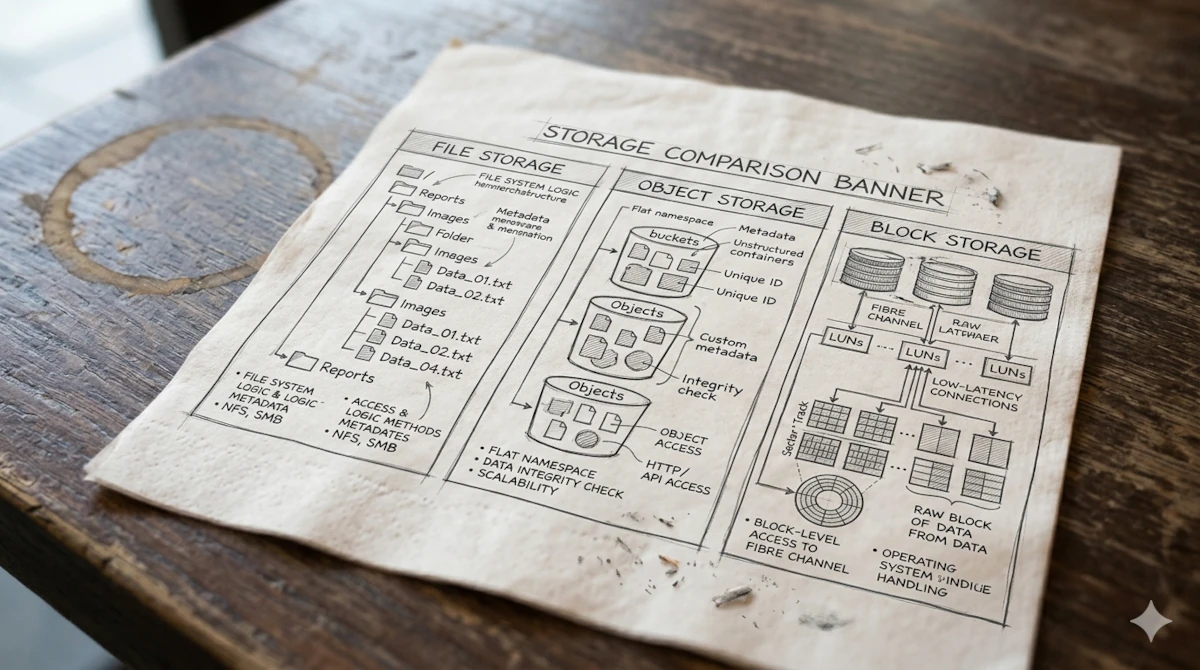
File Storage, Object Storage, or Block Storage? A Comprehensive Guide to Choosing the Right Storage Solution for Your Business
- 1: Understanding the Three Types of Storage from The Basics
- 2: Head-to-Head Comparison
- 3: When Should You Choose Each One?
- 4: Combination Strategy — Hybrid Storage Architecture
- 5: Checklist for IT Manager Before Making a Decision
- Conclusion
Imagine this scenario: Your team has just finished migrating hundred of terabytes of data to the cloud. The budget has been approved, infrastructure up and running, and then,three months later, you realize the database is running slowly, the cloud bill has doubled compared to estimates, and the develeper team is complaining that file access does not meet their application needs.
What’s wrong? Most likely: You chose the wrong type of storage.
This is not a rare mistake. Most IT Manager and Decission Maker fall into the same trap: choosing storang solutions based on solely cheapest price, or simply following vendor recommendations, without truly understand the fundamental differences between File Storage, Object Storage, and Block Storage.
All three of them are data storage solution, but they work in very different of ways, each has its own strengths, and they are designed for use cases that are not interchangeable.
This article is a practical guide for you as an IT Manager or Decision Maker. By the end of this article, You will be able to:
- Understanding how these three types of storage works by conceptually
- Comparing the three head-to-head based on relevan criteria
- Knowing when to choose each one
- Designing an efficiet and cost-effective hybrid storage strategy
- Using a decision-making checklist before purchasing or migrating
1: Understanding the Three Types of Storage from The Basics
Before getting into the comparison, it is important to establish a solid conceptual understanding. These three types of storage differ not only in technical terms, but also in the way they organize and access data.
1.1 File Storage: Digital Filling Cabinet
File Storage is a oldest and very familiar storage model. Data is stored in a hierarchical structure: folders within folders, similar with the file system in your personal computer.
Analogy: Imagine a large filling cabinet in an office. Each drawer is main folder, inside which are folders (subfolder), and inside those folders are single documents (file). To find a document, you need to know exactly which drawer and which folder it is in.
Technical Operations:
- Data is organised in a tree structure (tree hierarchy) with paths like as
/departemen/keuangan/laporan-2024/Q4.xlsx - Access is provided via network protocols like NFS (Network File System) for Linux/Unix environments, or SMB/CIFS for Windows environments
- Supports standart file operations: read, write, delete, rename, move to different folder
Key characteristics:
- Easy to use because it’s familiar to all user
- Supports shared access, many users can access the same folder at the same time
- Performance depends on network and hardware configuration
- Limited scalability: the larger the hierarchy, the more complex the management and the slower the search performance
Product Examples: NetApp ONTAP, Windows Server File Share, Amazon EFS, Azure Files, Google Filestore
1.2 Object Storage: GWarehouse with Barcode System
Object Storage is an modern storage model that is specifically designed for the cloud era and massive scale data. Unlike File Storage, there is no concept of folder or hierarchies here. Each piece of data is stored as an object consisting of three components:
- Data: the actual content of the file itself (images, videos, documents, logs, etc.)
- Metadata: descriptive information about the data (size, type, creation date, custom tags)
- Unique Identifier (ID): unique key used to retrieve the object
Analogy: Imagine a large warehouse without labeled rack. Every goods is given a unique barcode sticker. For taking goods, you don’t need know where is it, only scan the barcode, and the system will found it. You can save the additional note in the sticker: “Who does this item belong to? What is its condition? When was it last picked up?”.
Technical Details:
- Data is saved in the flat structure (without hierarchy)
- Access is provided by REST API or S3-compatible protocol (the popular Amazaon standart)
- Every object is have unique URL can be direct access
- Strongly support accessing from application or distributed system
Main Characteristics:
- Unlimited scalability, capable of storing billions of objects
- Cost per GB is very low, capable for data in big data
- Access based on API, ideal for integrating with modern application
- No capable for operation that needs modification of some file (should be rewrite all object )
- Higher latency compared to block storage
Product Examples: Amazon S3, Google Cloud Storage, Azure Blob Storage, MinIO (self-hosted)
1.3 Block Storage: High Performance Virtual Hard Disk
Block Storage is a storage model that operates at a low level. Data is divided into small pieces with fixed size that known as block, each with its own unique address. Without additional metadata, without folder structure, only raw data blocks.
Analogy: Imagine a physical hard disk that installed in your server, but this is a virtual version. Operating system can format and use the storage similar with internal disk, with full control for writing and reading data at a low level.
Technical Details:
- Data divides in fixed size block (usually 512 byte - 4 KB per block)
- Access is provided via the iSCSI protocol (via a IP network) or the Fibre Channel (via a dedicated network)
- Operating system or application manages the blocks directly, often through file system on top of it (ext4, NTFS, XFS, etc.)
- Read/write operations are supported in a very detailed and fast way.
Main Characteristics:
- The best performance among the three, very low latency, IOPS (Input/Output Operations Per Second) very high
- Idealy for workload that require consistency and I/O speed
- High cost per GB
- Does not support native shared access (typically one volume per server)
Product Examples: Amazon EBS, Google Persistent Disk, Azure Managed Disks, SAN (Storage Area Network)
2: Head-to-Head Comparison
Now that we understand how each one works, here is a direct comparison based on the dimensions most relevant to IT managers and decision makers:
| Dimension | File Storage | Object Storage | Block Storage |
|---|---|---|---|
| Data structure | Folder hierarchy | Flat (objek) | Raw data block |
| Access Protocol | NFS, SMB/CIFS | REST API, S3 | iSCSI, Fibre Channel |
| Performance (IOPS) | Mid | Low-Mid | Very high |
| Latency | Mid | High | Very low |
| Scability | Limited | Almost limitless | High |
| Cost per GB | Mid | Low | High |
| Shared access | Yes (multi-user) | Yes (via API) | Limited |
| Parsial Modification | Yes | No | Yes |
| User friendly | Very easy | Needs API | OS configuration |
| Suitable for | Document, colabs | Media, backup, log | Database, OS, VM |
Three Things to Keep in Mind
Performnce vs Cost is main trade-off. Block storage offers the best performance with high cost. Object storage is inexpensive but not suitable for low-latency workloads. File storage is somewhere in between.
Scalability is a critical factor in data growth. Object storage is the clear winner in here, platforms such as Amazon S3 in technical terms is have unlimited capacity. File storage begins to hit a bottleneck when data grows in petabyte scale.
Access Model determines the compatibility with your application. Legacy applications are generally more easy to integrate with file storage. Modern application and cloud-native are designed for object storage via API. Database and operating system almost need block storage.
3: When Should You Choose Each One?
This is the essence of this guide. Here are the practical framework for determining the right one storage based on the real use case.
3.1 Select File Storage If…
The right business condition:
- Your team needs shared drive for daily collaboration (word document, spreadsheet, presentation)
- Your environment is on-premises or hybrid, where the users access files from the workstation or laptop via internal networks
- Your application was designed for working with the traditional file system (path-based access)
- You need permission management based on folder which can be managed easily by the IT team
Examples of real use case:
- The manufacturing company with 600 employees stores SOP documents, technical drawings, and audit reports in the department shared folder
- The Consultant firm needs shared access o proposal, contracts, and project deliverables
- The education instution with file server is accessed by teachers and administration staffs
Note: If your data volume is expected to grow to hundreds of terabytes or more over the next 3–5 years, consider a phased migration to Object Storage for archival data.
3.2 Select Object Storage If…
The right business condition:
- You store digital assets in large amounts: product images, video, audio, PDF documents, backup files
- Your application is cloud-native or microservices that access data from REST API
- You need content global distribution (CDN integration)
- Your data is write-once, read-many, file was saved then read, rarely modified
- You want to save application logs, data analytics, or archives with the lowest possible cost
Examples of real use case:
- E-commerce platform stores 5 million product images for thousands of merchants, Object storage is a low-cost storage solution with CDN direct access to end users.
- Fintech company stores millions of users’ KYC documents
- DevOps team saves daily database backups, artefacts and application logs
Cost-saving tip: Take advantage of the storage tiering feature—frequently accessed data (hot) stays in the standard tier, while older, rarely accessed data (cold/archive) is automatically moved to a tier that costs 70–80% less.
3.3 Select Block Storage If…
The right business condition:
- You operate a relational database (MySQL, PostgreSQL, Oracle, SQL Server) that needs high IOPS and low latency
- You operate a virtual machine (VM) or container that needs an OS disk
- Your application is a business critical system likes ERP, core banking, or reservation system that is not tolerant of latency
- You need Predictable I/O consistency without sudden fluctuations in performance
Examples of real use case:
- Bank operates transaction database with hundreds of thousands transactions per second. Block storage with NVMe give sub-millisecond latency
- Retail company operates SAP ERP in cloud, this system needs high performance disk to keep standart time responses
- SaaS platform operates PostgreSQL cluster with replication, every nodes needs dedicate block storage
Cost warning: Block Storage is the most expensive option. Make sure you really need its high performance—don’t use it for static or archival data.
4: Combination Strategy — Hybrid Storage Architecture
The good news is: you don’t have to choose just one. Most modern enterprises use all three at the same time, each for its appropriate role.
Reference Architecture: Mid-Scale E-Commerce Platform
| E-COMMERCE APPLICATION | ||
|---|---|---|
| BLOCK STORAGE | OBJECT STORAGE | FILE STORAGE |
| Database (MySQL/Postgres) Server OS disk Swap & cache |
Product photos Video reviews Database backups Application logs Transaction archives |
Shared internal documents Team collaboration files Templates Invoices / reports |
| Priority: PERFORMANCE | Priority: COST & SCALE | Priority: EASE OF ACCESS |
Tiering Principles: Hot, Warm, and Cold Storage
The most effective cost-saving strategy is to implement data tiering based on how frequently the data is accessed:
Hot Storage (access is very often):
- Uses block storage or object storage premium tier
- Active transaction data, user sessions, app cache
- High costs, but the volume can be low
Warm Storage (occasional access):
- Use standard-tier Object Storage or File Storage
- Data from the past 3–12 months, reports that are still relevant
- Moderate costs
Cold/Archive Storage (infrequent access):
- Use the archive tier of object storage (e.g., Amazon S3 Glacier, Azure Archive)
- Data older than 1 year, long-term backups, compliance data
- Very low costs (as low as 1/10 the cost of hot storage), but longer retrieval times
Potential savings: Companies that implement tiering correctly save an average of 40–60% on storage costs compared to storing all data on the same tier.
5: Checklist for IT Manager Before Making a Decision
Use these 10 questions as a decision-making framework before you buy, subscribe to, or migrate to a new storage solution:
Questions About Workload
1. What kind of apps will access this storage?
- Legacy/on-premise application → tends to File Storage
- Cloud-native/microservices application → tends to Object Storage
- Database or operationg system → Block Storage
2. What is the data access pattern?
- Many users are accessing the file at the same time → File Storage
- Read/write application via API → Object Storage
- Systems that require fast and consistent I/O → Block Storage
3. Does the data need to be modified after it is saved?
- Yes, frequently modified in parts → File or Block Storage
- No, write-once, read-many → Object Storage
Questions About Performance
4. What is the acceptable latency target?
- Sub-10 ms or faster → Block Storage is required
- Hundreds of milliseconds is still acceptable → Object Storage can be considered
5. What is the estimated number of IOPS required?
- Over 10,000 sustained IOPS → Block Storage
- Under 1,000 IOPS → File or Object Storage
Questions About Scale and Growth
6. What is the current volume of data, and how fast is it growing?
- Under 10 TB, slow growth → File Storage is sufficient
- Tens to hundreds of TB, rapid growth → Object Storage
7. Do you need global access or content distribution across multiple regions?
- Yes → Object Storage with CDN integration
Questions About Costs
8. What is the annual storage budget?
- Tight budget, large data volumes → Object Storage (lowest cost per GB)
- Performance-critical, budget available → Block Storage
9. Is there any data that can be moved to cold storage to save costs?
- Almost always, yes — identify data that has been inactive for more than a year
Questions About Security and Compliance
10. Are there any specific regulatory or compliance requirements?
- Data residency regulations → ensure your storage provider has a local region
- Audit trails and versioning → Object Storage generally performs better
- Encryption at rest and in transit → all modern storage solutions support this
Quick Decision Framework
If you need a quick answer, follow these steps:
Is this for a database or the OS disk?
    → YES: Use Block Storage
    → NO ↓

Is this for large-scale static data (media, backups, logs)?
    → YES: Use Object Storage
    → NO ↓

Is this for file collaboration among users?
    → YES: Use File Storage
Conclusion
Choosing the right type of storage isn’t just a technical decision—it’s a business decision that directly impacts system performance, cost efficiency, and your team’s ability to scale in the future.
Let’s recap the key points:
- File Storage is the best choice for team collaboration and shared access files. Familiar, easy to manage, but limited in scalability.
- Object Storage is the best choice for large scale data that access via API: media, backup, log and archive. Low cost, high scalability.
- Block Storage is the best choice when performance is everything: database, virtual machine, and critical system. High cost, but indispensable for this workload
- The best strategy for a company is to leverage all three according to their respective roles, combined with data clustering to optimize costs.
Before making a final decision, use the 10-question checklist in Section 5 as a guide. Involve your development team and system architects, as sound storage decisions result from a collaboration between business acumen and technical expertise.
Taking the time to understand these differences today will save you from much higher migration costs and downtime in the future.
Do you have questions about storage architecture for your specific business needs? Contact us at Dika Karya Tech!
Related Posts
- Understanding Server-Sent Events (SSE) for Real-Time Communication
- What to Look for When Hiring a Laravel Developer (And the Questions That Actually Reveal It)
- Laravel + React + Inertia.js: Why This Stack Works So Well for SaaS Products
- How We Use AI to Ship Laravel Projects Faster (Without Cutting Corners)
- 7+ Hosting Options for Tailwind CSS Websites in 2026