
Understanding Server-Sent Events (SSE) for Real-Time Communication
- Advantages & Benefits of SSE
- Limitations of SSE
- Example of SSE Source Code Implementation with PHP
- Example of SSE Source Code Implementation in Go
Server-Sent Events (SSE) is technology that used for implementing real-time communication where the server send proactive data to the client.
Traditionally, clients creates an HTTP connection to the server to receive data. To receive regular updates, Polling or Long Polling techniques are often used via recurring HTTP requests.
As an alternative to a persistent connection, we can use Websockets which enable continuous two-way communication without establishing a new connection. Websocket is the best way if the application needs send and receive data intensively between client and server. However, in most cases, such as live dashboard or live analytics board, we only need to receive data from the server. In this scenario, Websockets would be an unnecessary burden.
To address this, we can use Server-Sent Events (SSE). Official details about this protocol can be found in the Server-sent events standard documentation.
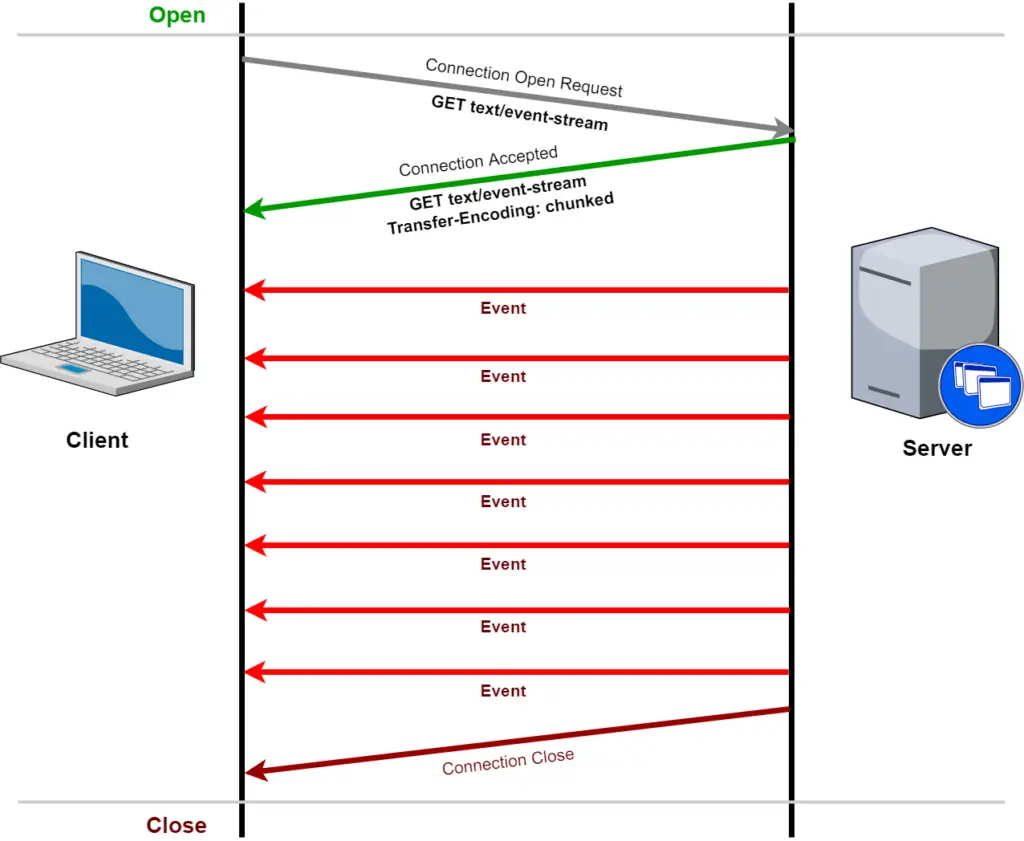
Advantages & Benefits of SSE
Compared to Polling or Websockets, SSE offers the following benefits for one way scenario:
- One-Way Persistent Connection: The client connects to the server, and the server keeps the connection open to send data to the client. The client cannot send a response once the connection is established.
- Efficient & Real-time: Data is sent to the client in real time using just a single standard HTTP connection, making it far more efficient than polling.
- Auto-Reconnect: The client will automatically retry the connection if there is a problem with the server (for example, if the server restarts).
- Resource-Efficient: Uses fewer resources than WebSockets because it does not require a complex bidirectional TCP/IP socket connection.
- Web Support: Available and usable within Web Workers.
- Scalability: Ideal for applications with many clients that only need to monitor data.
- Simple Implementation: The development process is much easier and simpler on both the client and server sides.
Limitations of SSE
Although lightweight and efficient, SSE has several limitations:
- Maximum Connection Limit: When using HTTP/1.1, browsers limit the number of active connections to 6–8 per domain. However, with HTTP/2, the default limit is 100 connections (and can be changed via server configuration).
- Supports UTF-8 Text Only: You can only send text data consisting of UTF-8 characters because the content type is text/event-stream.
- Pure One-Way Communication: Does not support data transmission from the client to the server (client-to-server). If clients need to send data, they must use a separate HTTP request.
Example of SSE Source Code Implementation with PHP
<?php

header('Content-Type: text/event-stream');
header('Cache-Control: no-cache');
header('Connection: keep-alive');

$eventData = [
    'message' => 'Hello from PHP!',
    'time' => time()
];

// Data wajib diawali dengan "data: " dan diakhiri "\n\n"
echo "data: " . json_encode($eventData) . "\n\n";

ob_flush();
flush();

sleep(5); // Simulasi penundaan 5 detik

$eventData = [
    'message' => 'Another message from PHP!',
    'time' => time()
];

echo "data: " . json_encode($eventData) . "\n\n";

ob_flush();
flush();
Example of SSE Source Code Implementation in Go
package main

import (
    "encoding/json"
    "fmt"
    "net/http"
    "time"
)

func main() {
    http.HandleFunc("/sse", func(w http.ResponseWriter, r *http.Request) {
        w.Header().Set("Content-Type", "text/event-stream")
        w.Header().Set("Cache-Control", "no-cache")
        w.Header().Set("Connection", "keep-alive")

        flusher, ok := w.(http.Flusher)
        if !ok {
            http.Error(w, "Streaming unsupported!", http.StatusInternalServerError)
            return
        }

        eventData := map[string]interface{}{
            "message": "Hello from Golang!",
            "time":    time.Now().Unix(),
        }

        // Parse ke JSON dan kirim dengan format SSE
        jsonData, _ := json.Marshal(eventData)
        fmt.Fprintf(w, "data: %s\n\n", jsonData)
        flusher.Flush()

        time.Sleep(5 * time.Second) // Simulasi penundaan 5 detik

        eventData = map[string]interface{}{
            "message": "Another message from Golang!",
            "time":    time.Now().Unix(),
        }

        jsonData, _ = json.Marshal(eventData)
        fmt.Fprintf(w, "data: %s\n\n", jsonData)
        flusher.Flush()
    })

    fmt.Println("Starting server on port 8080")
    http.ListenAndServe(":8080", nil)
}
Note:
- Make sure to use the correct HTTP headers (text/event-stream and no-cache) when sending an SSE stream.
- Use a string format such as JSON or XML to send event data.
- Don’t forget to periodically flush data to the client so that messages are sent immediately.
- Avoid caching or proxy buffering (e.g., in Nginx) on this SSE endpoint, as it will hinder the real-time data stream to the client.
Related Posts
- File Storage, Object Storage, or Block Storage? A Comprehensive Guide to Choosing the Right Storage Solution for Your Business
- What to Look for When Hiring a Laravel Developer (And the Questions That Actually Reveal It)
- Laravel + React + Inertia.js: Why This Stack Works So Well for SaaS Products
- How We Use AI to Ship Laravel Projects Faster (Without Cutting Corners)
- 7+ Hosting Options for Tailwind CSS Websites in 2026